People & org chart
One employee record. A living org chart.
Every module reads from the same person record — departments, positions, workplaces, reporting lines — with role-based access so people see exactly what they should.
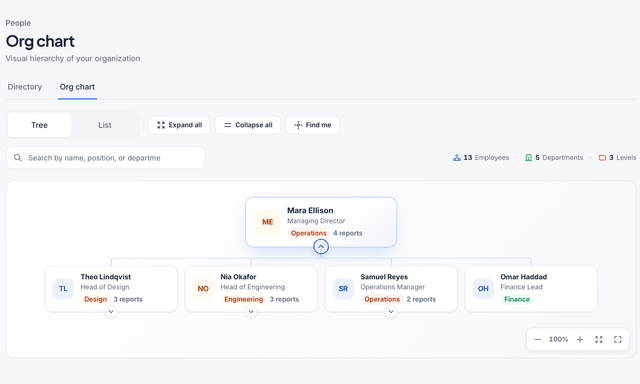
Real HourSquare screens, filled with a made-up demo company.
Capabilities
What the people directory does.
One record per person, the structure around it, and the permissions that decide who can see which part.
One profile per person
Personal details, contact information, contracts, documents and equipment live on one record that every other module reads.
Departments, positions, workplaces
Build your structure once: departments with managers, positions with titles, workplaces for offices and remote setups.
A living org chart
Reporting lines come from the record, so the chart is always current. Change a manager and the chart, approvals and visibility follow.
Role-based access
Roles decide who sees what — an employee sees their own record, a manager their team, HR everyone. Permissions are set per module.
Employee self-service
Employees keep their own contact details and documents current and see their contracts and equipment without asking HR.
History on every change
Every edit to a record is logged with who made it and when, so you can answer questions months later.
How it fills in
From a new hire to a complete record.
The directory is not a separate list to maintain — it fills in as you use the rest of HourSquare.
- 1
Add the person
Create the record with the essentials — with auto-start on, adding the person also starts their onboarding.
- 2
Place them in the structure
Assign a department, a position, a workplace and a manager. The org chart updates itself.
- 3
Set who sees what
Give the person a role. Employees, managers and HR each see the part of the record they need.
- 4
Keep it current
Employees update their own details; leave, time and payroll write back to the same record.
Who sees what
Three views of the same record.
Access is set per role and per module, so one record serves the employee, the manager and HR without over-sharing.
Employee
Their own record, nothing else.
Personal details, contracts and documents Leave balances and payslips Edit their own contact information
Manager
Their team, drawn from the reporting lines.
Team members and their positions Requests waiting for approval Who is away and when
HR & admins
The whole company, with the permissions to change it.
Every record, every department Roles and permissions per module The audit log for record changes
Works with
The record every module reads.
The directory is the foundation — these modules write to it and read from it.
FAQ
Questions about the directory
Short answers to what people ask about records and access.
See all questionsCan employees edit their own information?
How is the org chart built?
Can a manager see salaries?
What happens to a record when someone leaves?
Ready when you are
Put every person on one record.
Every module included, no card to sign up. Free forever for teams of up to 10 people; larger teams are free for now, and we'll tell you first if that changes.
Free forever up to 10 people · No card to sign up · GDPR-native · EU-hosted