Anonymous by design
A report is saved with no name, no account and no device fingerprint. There is no field for your administrators to look up.
Speak up (whistleblowing)
An anonymous reporting channel with two-way conversation, built for the EU Whistleblower Directive — the case stores no name or account, so an administrator has nothing to trace the reporter by.
Capabilities
A channel people will actually use has to be anonymous by design, not by promise: the case itself holds no name and no account.
A report is saved with no name, no account and no device fingerprint. There is no field for your administrators to look up.
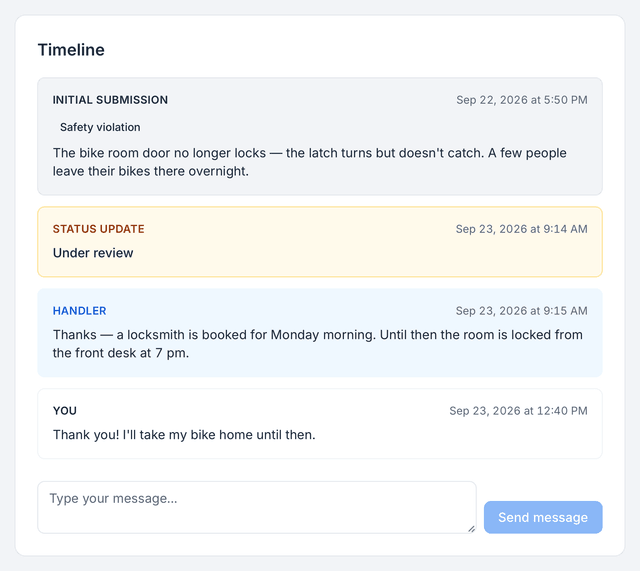
The handler can ask follow-up questions and the reporter can answer, through the same anonymous case, without ever revealing who they are.
An internal channel with acknowledgement, follow-up and confidentiality — the elements Directive (EU) 2019/1937 requires of internal reporting.
Reports land with the people you designate. Each case keeps its conversation and its status together, separate from the rest of HR.
Every status change and every message on a case is kept with its date, so you can show how a report was handled. The case never records who reported.
The channel ships with every HourSquare account, like every other module: free forever for teams of up to 10 people, and free for now for larger teams.
How a case flows
Four steps, and at no point does anyone learn who spoke up.
They open the channel in HourSquare, describe the concern and send it. The report is saved without their name or account.
The case appears in the handler's inbox and is acknowledged. The reporter can come back to it at any time.
Handler and reporter exchange messages inside the case. Questions get answered; identity stays hidden.
The outcome is recorded and the case closed. The case history keeps the how, never the who.
The Directive
Directive (EU) 2019/1937 sets the baseline for internal reporting channels. These are three of its requirements — the channel is designed around them.
Private-sector employers with 50 or more workers must have an internal reporting channel.
Receipt of a report must be acknowledged to the reporter within seven days.
Feedback on the report must follow within a reasonable time — no longer than three months from the acknowledgement.
Source: Directive (EU) 2019/1937, Articles 8 and 9. National transposition may set stricter rules — check the law that applies to you.
Works with
Speak-up is the one module that never touches the employee record. Everything else shares it.
FAQ
Short answers to what people ask before they trust a channel.
See all questionsReady when you are
Every module included, no card to sign up. Free forever for teams of up to 10 people; larger teams are free for now, and we'll tell you first if that changes.
Free forever up to 10 people · No card to sign up · GDPR-native · EU-hosted