Leave management

Leave that keeps its own books.

Policies in days or hours with accrual rules, a live balance for every employee, requests that go straight to the right manager, a team calendar, and a personal calendar feed for Google, Outlook or Apple Calendar.

No card to sign upNo sales call neededFree for now
hub.hoursquare.com
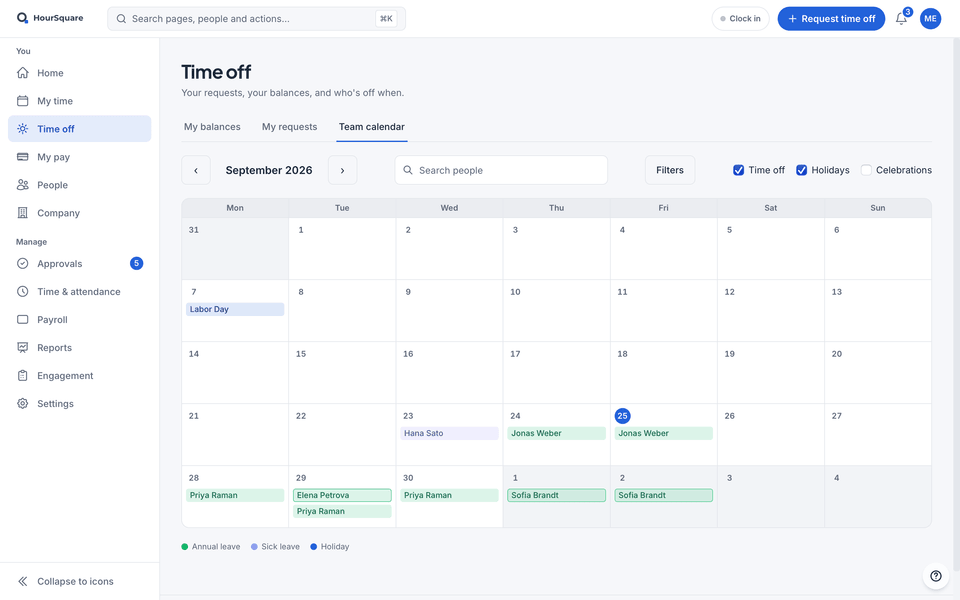
HourSquare team calendar for September, with demo data: approved and pending time off, sick leave and a public holiday.

Real HourSquare screens, filled with a made-up demo company.

Balances update on approval

The moment a request is approved, the employee's balance reflects it. No monthly recount.

Requests go to the right manager

Each request is routed to the employee's manager for a decision — nobody forwards emails.

Your time off in your own calendar

Approved leave shows on the team calendar, and each person gets an ICS feed of their own time off and holidays for Google Calendar, Outlook or Apple Calendar.

Capabilities

What leave management does.

Set the rules once; HourSquare keeps the balances and the calendar honest.

Policies with accrual

Define each leave type as a policy: in working days or hours, how it accrues, whether it is paid and whether half days are allowed. Start the leave year in January, on a date you choose or on each person's hire anniversary, and prorate it for part-timers by their contract hours.
Live balances

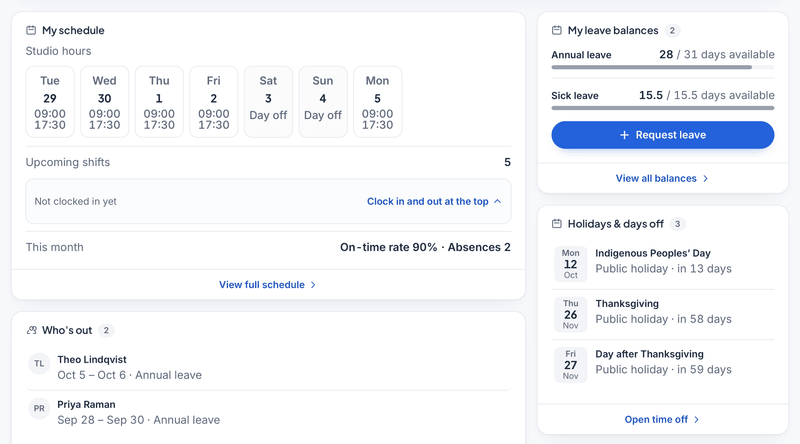
Every employee sees what they have left. Managers see it too before they approve.

Manager approvals

Requests land with the employee's manager, who approves or declines in one place.

Team calendar and a personal ICS feed

See who is away and when on the team calendar. Subscribe to your own feed from your calendar app so your time off and holidays show up next to your meetings.

Each person's own week

Working days and the first day of the week are set per workplace, so a request counts only the days that person would have worked.

Public holidays by region

Load your country's public holidays, pick the states, cantons or provinces that apply, mark any day as not a day off here, and add your own. Holidays show on the team calendar and never count as leave.

How it flows

From policy to approved request.

The path a leave request takes through HourSquare, in four steps.

  1. Set up leave policies

    Create policies with their accrual rules, or start from statutory defaults where there are some for your country, and assign them to employees.

  2. The employee requests time off

    They pick a policy and dates and see their balance before sending.

  3. The manager approves or declines

    The request is routed to the employee's manager, who decides in HourSquare.

  4. Balance and calendar update

    The balance changes the moment the request is approved, and the days appear on the team calendar and in the employee's calendar feed.

An employee’s HourSquare home (demo data): the week’s schedule, leave balances with a Request leave button, who is out, and the upcoming holidays.
Leave in HourSquare — a request, the balance it draws on, and the team calendar.

Works with

Leave talks to the rest of HourSquare.

Approved leave shows on timesheets and flows into the pay run for that period.

FAQ

Questions about leave

See all questions
Can I set leave up for my country's rules?
Yes, you set each policy yourself: working days or hours, how it accrues, carry-over and when it expires, whether half days are allowed, when the leave year starts (January, a date you choose or each person's hire anniversary), and prorating for part-timers by contract hours. For a few countries you can start from statutory defaults that name their legal source; they are a starting point, so check your local rules. Requests count each person's own working days and public holidays.
Can I see my time off in Google Calendar or Outlook?
Yes. Every employee has a personal ICS subscription link in their profile. Add it to Google Calendar, Outlook or Apple Calendar and their approved leave and public holidays appear there automatically. The team calendar itself is viewed in HourSquare.
How are balances calculated?
Each policy defines how its days or hours accrue. An employee's balance follows that rule and is reduced the moment a request is approved.
Who approves a request?
The employee's manager. The request is routed to them automatically, and they approve or decline it in HourSquare.

Ready when you are

Get your team's leave under control.

Free for now, every feature included, no card to sign up. We'll tell you before anything changes.

Free for now · GDPR-native · EU-hosted

HOURSQUARE · EST 2026 HR you run yourself.