Free HR software

Free HR software for teams without an HR department.

People records, onboarding, leave, time tracking, payroll with payslips, expense claims and approvals in one product. You create the company yourself, add your people and switch on what you need. No card, no demo call.

No card to sign upNo sales call neededFree forever up to 10 people
hub.hoursquare.com
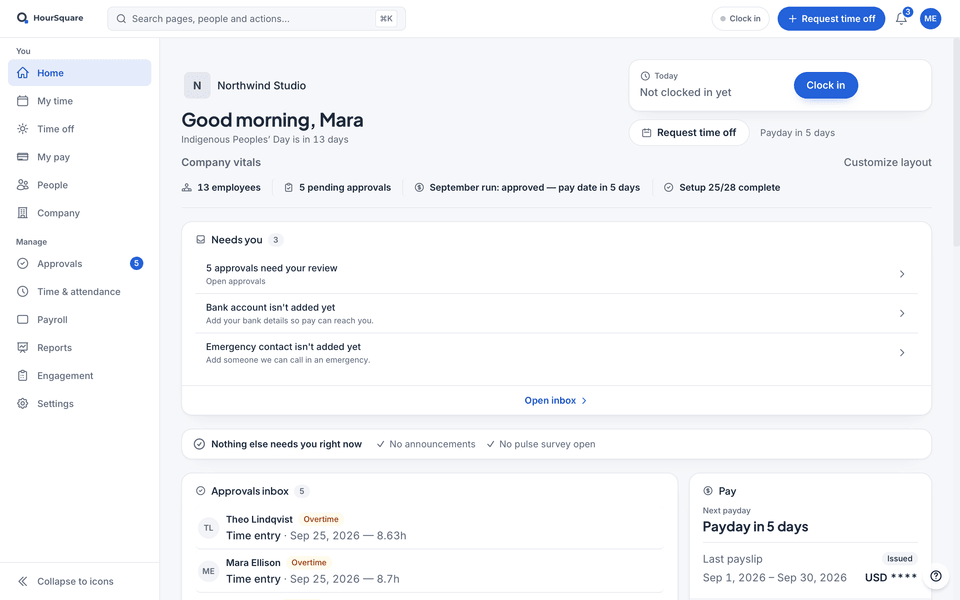
HourSquare home for a company owner, with demo data: company vitals, a “Needs you” list led by the approvals waiting, then the approvals inbox and pay cards, next to the You and Manage sidebar.

HourSquare home for a company owner, with demo data: company vitals, a “Needs you” list led by the approvals waiting, then the approvals inbox and pay cards, next to the You and Manage sidebar.

Real HourSquare screens, filled with a made-up demo company.

Every module in one product

People, onboarding, leave, time, payroll, expenses and approvals read the same employee record, so nothing is typed twice.

Nothing locked behind an add-on

Payroll and time tracking are not extras. Every module is switched on from the first day.

You set it up yourself

Sign up, add your people and set your rules without a demo or a sales call.

What is in it

The HR jobs a small team actually has.

Four areas that cover most of the work. Each one reads the same employee record.

People records and onboarding

Every person has one record: contact details, contract, manager, department and workplace. The org chart draws itself from the manager on each record. When you add a new hire, an onboarding template can start by itself and hand each task to IT, the manager or the new hire.

  • Employees keep their own contact details and documents current
  • A checklist for the new hire and one status board for you
  • Offboarding uses the same templates and disables the account on the leaving date
  • Roles decide who sees which part of a record
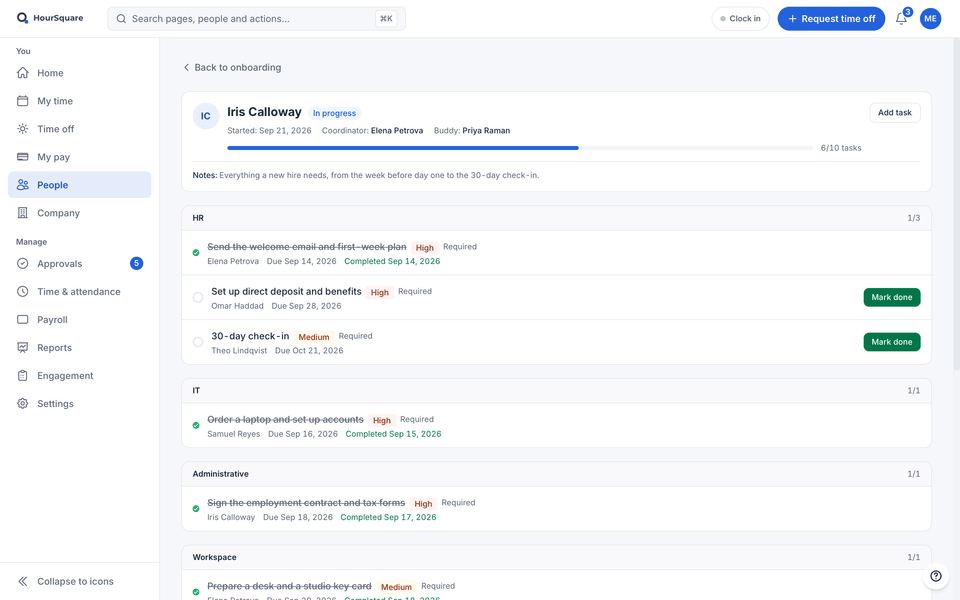
A new hire’s onboarding checklist in HourSquare, with demo data: coordinator and buddy, progress, and tasks grouped by area, each with its owner and due date — some done, some still to do.

A new hire’s onboarding checklist in HourSquare, with demo data: coordinator and buddy, progress, and tasks grouped by area, each with its owner and due date — some done, some still to do.

Time off and hours

Set leave policies in days or hours with accrual rules, and employees see their balance before they ask. Hours go into timesheets checked against a fixed schedule or a rotating shift pattern. Managers approve both in the same place.

  • Balances update the moment a request is approved
  • A team calendar shows who is away, with public holidays by region
  • Approved hours and approved leave carry into the pay run
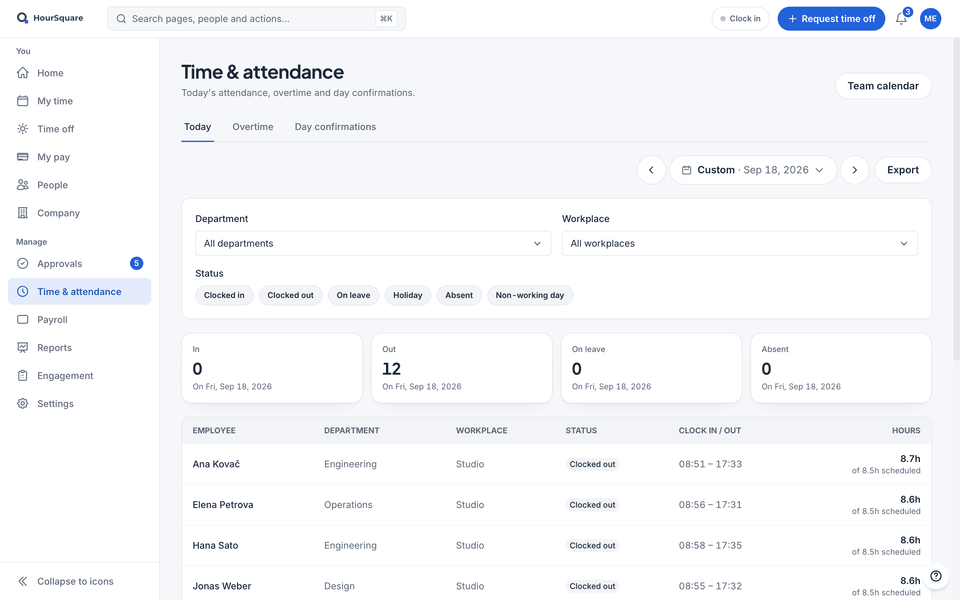
HourSquare Time & attendance for one day, with demo data: how many people were in, out, on leave or absent, then each person’s clock-in and clock-out and hours against the schedule.

HourSquare Time & attendance for one day, with demo data: how many people were in, out, on leave or absent, then each person’s clock-in and clock-out and hours against the schedule.

Payroll with payslips

Payroll runs on tax packs for 24+ countries, or on pay items you set up yourself anywhere else. Each run produces a payslip for every person and the files your bank and your accountant ask for.

  • Income tax and social contributions worked out per employee from the tax pack
  • Payslips in your own wording
  • Payment and accountant exports in a layout you save once
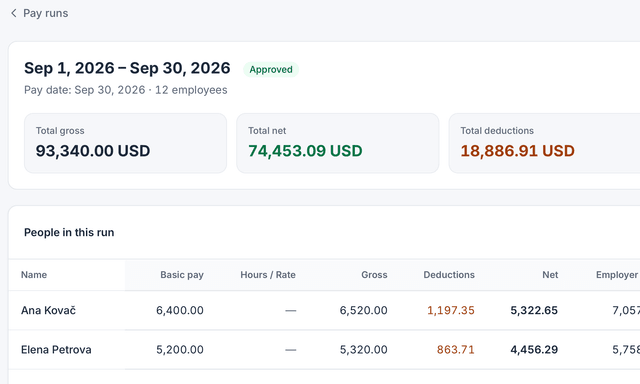
A pay run in HourSquare with gross, deductions and net per person (demo data).

A pay run in HourSquare with gross, deductions and net per person (demo data).

Expenses and approvals in one inbox

Leave requests, time entries, overtime, day corrections, profile changes and expense claims arrive in one inbox, oldest first. You choose who approves leave, time entries, overtime, day corrections and profile changes, and name a fallback approver.

  • One list instead of messages spread over several apps
  • Approve, reject or open a request straight from the list
  • Overtime pre-approval and day corrections apply only once you switch them on
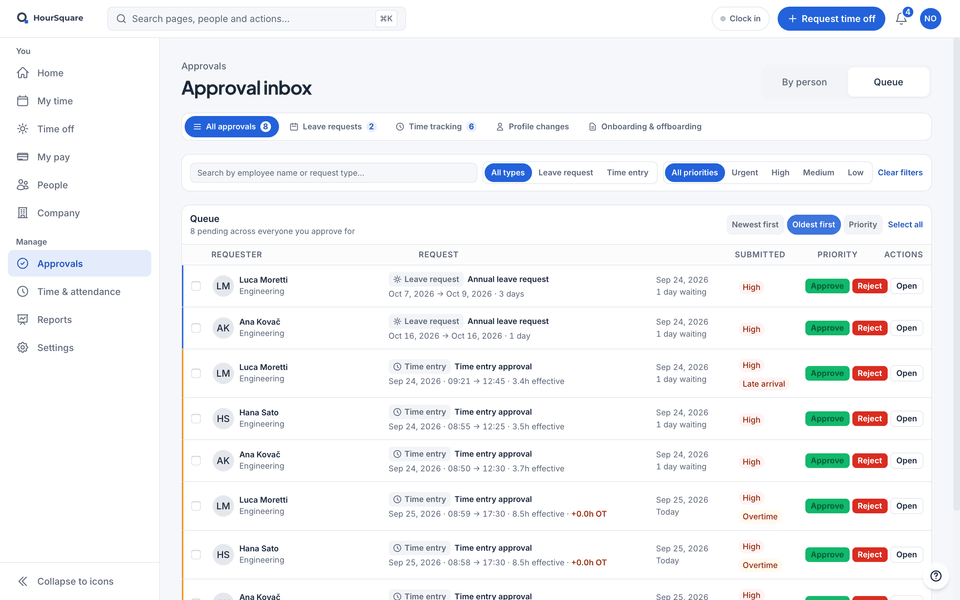
HourSquare approval inbox for a team lead, in Queue view with demo data: leave requests and time entries waiting for a decision, oldest first, each with approve, reject and open buttons.

HourSquare approval inbox for a team lead, in Queue view with demo data: leave requests and time entries waiting for a decision, oldest first, each with approve, reject and open buttons.

How it works

From sign-up to the first pay run.

You do the setup yourself, in this order.

  1. Create the company yourself

    Sign up on this site. There is no demo to book and no card to enter; a setup checklist lists the rest.

  2. Add your people

    Add each person with their manager, department and workplace, then invite them so they can log in to their own view.

  3. Set your rules

    Create leave types, choose how people record time, name who approves what and set the pay items for payroll.

  4. Run it

    Approve requests as they arrive, run payroll for the period and let each new hire follow their onboarding checklist.

What free means

What free means here.

Free forever for teams of up to 10 people. Free for now for larger teams. If that changes, we'll tell you first. Every module is included, payroll too.

Keep exploring

Where to go next.

FAQ

Questions about free HR software

See all questions
Is HourSquare really free HR software?
Yes. Free forever for teams of up to 10 people. Free for now for larger teams. If that changes, we'll tell you first. Every module is included, payroll too, and signing up needs no card.
Do I need an HR person to set it up?
No. You create the company yourself, with no demo call. A setup checklist lists the steps: adding people, setting who approves what, inviting the team, creating time off types and choosing how people record time.
Which HR jobs does it cover?
People records and the org chart, onboarding and offboarding, leave, time tracking, payroll with payslips, expense claims and approvals, plus an anonymous speak-up channel and reports.
Can it run payroll for my country?
Payroll has tax packs for 24+ countries. If yours is not one of them, start from a blank pay schedule and add your own pay items. Payslips and export files work the same either way.
Can my employees use it too?
Yes. Employees log in to see their own balances, schedule and payslips, request time off and update their own details. Managers see their team. What each role sees is set per module.

Ready when you are

Run HR yourself, for free.

Every feature included, no card to sign up. Free forever for teams of up to 10 people; larger teams are free for now, and we'll tell you first if that changes.

Free forever up to 10 people · GDPR-native · EU-hosted

HOURSQUARE · EST 2026 HR you run yourself.