For small teams

HR software for small business that replaces the spreadsheet.

A small team has no HR department, but it still has contracts, leave balances, hours, payslips and new hires to keep straight. HourSquare puts them in one place that you set up yourself, one module at a time.

No card to sign upNo sales call neededFree forever up to 10 people
hub.hoursquare.com
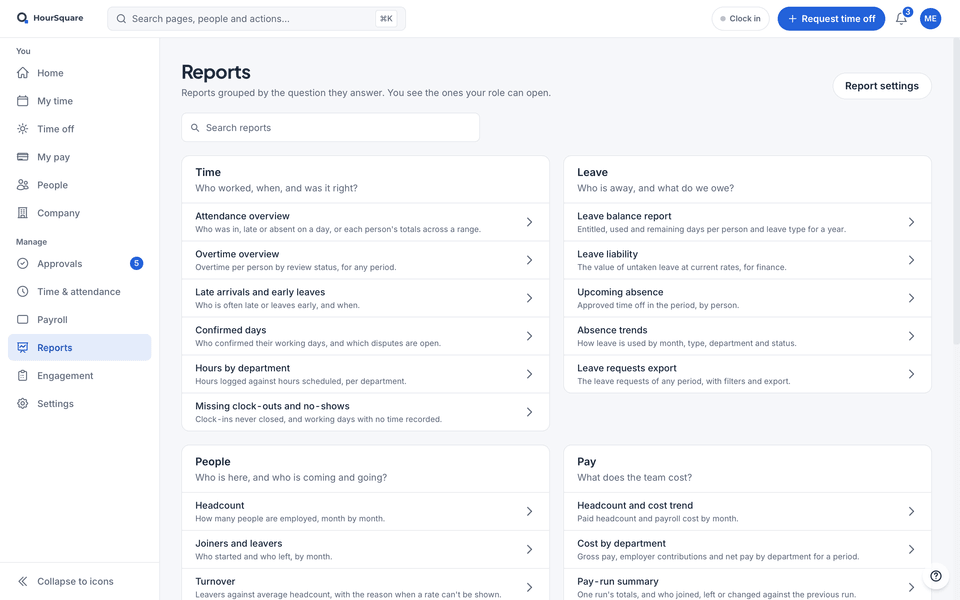
The HourSquare reports hub, with demo data: reports grouped by the question they answer — Time, Leave, People and Pay — each with a one-line purpose.

The HourSquare reports hub, with demo data: reports grouped by the question they answer — Time, Leave, People and Pay — each with a one-line purpose.

Real HourSquare screens, filled with a made-up demo company.

One record for each person

Contract, manager, leave, hours and pay hang off the same record, so a change is made once.

Built for whoever ends up running HR

You sign up and set it up yourself, with no demo, no consultant and no HR specialist.

Start small, add modules later

Begin with people and leave. Switch on time, onboarding or payroll when the need arrives.

Spreadsheet or software?

Why HR software, and what a small team needs.

A short, honest list instead of an enterprise suite.

Where a spreadsheet stops working

A spreadsheet is a fine start. It stops working when two people edit it at once, when a balance has to be recounted by hand and when an approval lives in someone's inbox. Hours then get retyped for payroll, and a file of personal data sits where anyone with the link can open it.

  • Several versions of the file, and nobody sure which is current
  • Leave balances recounted by hand every month
  • Who approved what is buried in chat threads and email
  • Hours typed a second time into payroll
What a small team needs

Not an enterprise suite. A short list: one record for each person, time off with balances, a way to record hours, payroll with payslips, a checklist for each new hire and approvals that reach the right person. Anything beyond that can wait until you need it.

  • A record for each person with their manager, contract and workplace
  • Leave policies, balances and a calendar of who is away
  • Timesheets against a schedule, approved by the manager
  • Payroll that reads the approved hours and leave
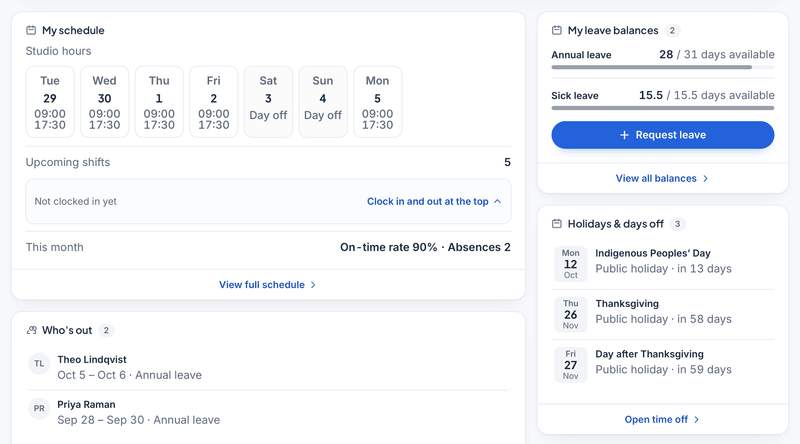
An employee’s HourSquare home (demo data): the week’s schedule, leave balances with a Request leave button, who is out, and the upcoming holidays.

An employee’s HourSquare home (demo data): the week’s schedule, leave balances with a Request leave button, who is out, and the upcoming holidays.

What HourSquare covers

Six modules on one employee record: onboarding, leave, time tracking, payroll, the people directory and an anonymous speak-up channel. Expense claims, approvals and reports sit on the same platform.

  • Onboarding templates that start when you add the hire
  • Leave and time with approvals routed to the manager
  • Payroll on tax packs for 24+ countries, with payslips and export files
  • Reports that read the data you already keep
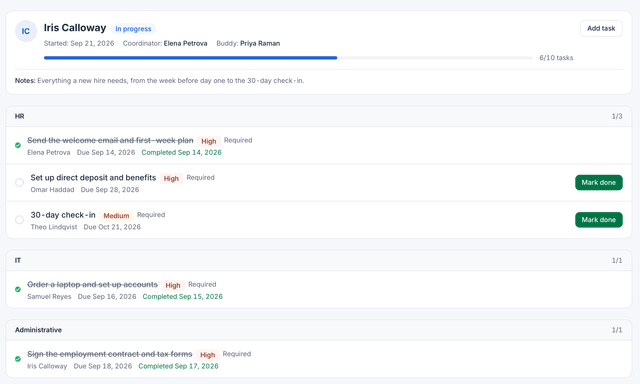
A new hire’s onboarding checklist in HourSquare: progress, owners and due dates (demo data).

A new hire’s onboarding checklist in HourSquare: progress, owners and due dates (demo data).

Who sees what

A small team still has things not everyone should see. Each person logs in to their own view: employees see their balances, schedule and payslips, managers see their team's leave and time, and pay stays with HR unless a role allows it. Employees keep their own contact details current themselves.

  • Permissions are set per module
  • Employees and managers each get their own view
  • One audit log records changes to employee records and settings
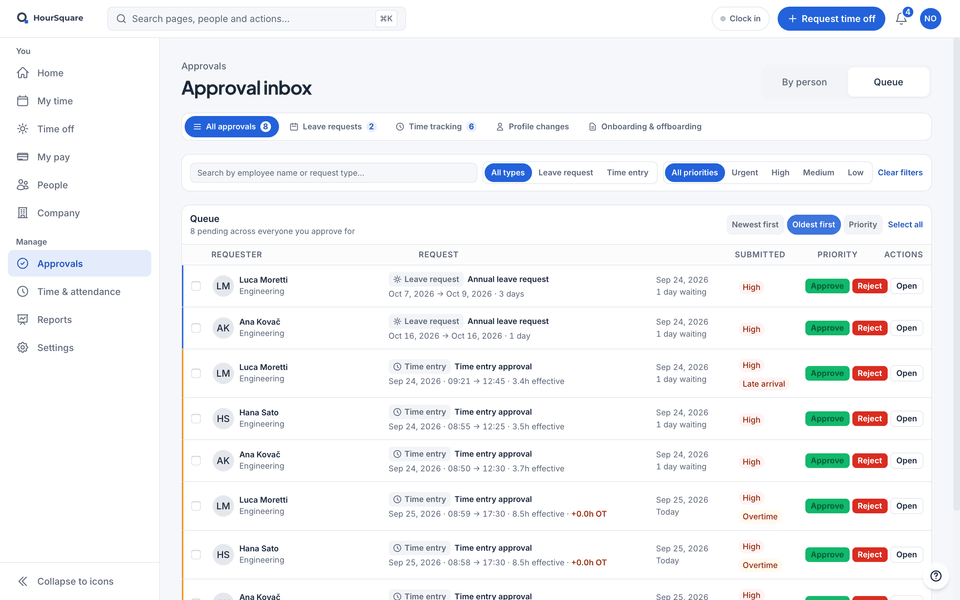
HourSquare approval inbox for a team lead, in Queue view with demo data: leave requests and time entries waiting for a decision, oldest first, each with approve, reject and open buttons.

HourSquare approval inbox for a team lead, in Queue view with demo data: leave requests and time entries waiting for a decision, oldest first, each with approve, reject and open buttons.

How it works

Set it up yourself, in four steps.

No consultant and no demo call. Do the steps in order and add modules as you go.

  1. Create the company yourself

    Sign up on this site. There is no demo to book and no card to enter.

  2. Add your people

    Add each person with their manager, department and workplace, then invite the team to log in.

  3. Set your rules

    Create leave types, choose how people record time, say who approves what and, when you are ready, set pay items.

  4. Run it

    Handle requests as they come in, run payroll for the period and onboard each new hire from a checklist.

What free means

Small teams start free.

Free forever for teams of up to 10 people. Free for now for larger teams. If that changes, we'll tell you first. Every module is included, with no sales call needed.

Keep exploring

Where to go next.

FAQ

Questions about HR software for small business

See all questions
Do I need HR software if I only have a few employees?
Not necessarily on day one. It starts to pay off when balances, approvals or payroll hours are being tracked in more than one place, or when you hire and want the same steps every time.
What should HR software for a small business include?
A record for each person, leave with balances, time tracking, payroll with payslips, onboarding and approvals. Each should read the same record, so you enter a person once.
Is HourSquare free for a small business?
Yes. Free forever for teams of up to 10 people. Free for now for larger teams. If that changes, we'll tell you first. Every module is included, payroll too.
Can I move over from a spreadsheet gradually?
Yes. Start with people and leave, then add time tracking, onboarding or payroll when you need them. Every module uses the same employee record.
How does HourSquare compare with other HR tools?
The alternatives hub puts HourSquare next to other HR products so you can compare them yourself. You can also try HourSquare directly: signing up takes no card.

Ready when you are

Run HR yourself, without the spreadsheet.

Every feature included, no card to sign up. Free forever for teams of up to 10 people; larger teams are free for now, and we'll tell you first if that changes.

Free forever up to 10 people · GDPR-native · EU-hosted

HOURSQUARE · EST 2026 HR you run yourself.