Free payroll software

Free payroll software for small business, in any country.

Run payroll on tax packs for 24+ countries, or on pay items you set up yourself in any other country. Every run produces a payslip for each person and the files your bank and your accountant ask for.

No card to sign upNo sales call neededFree forever up to 10 people
hub.hoursquare.com
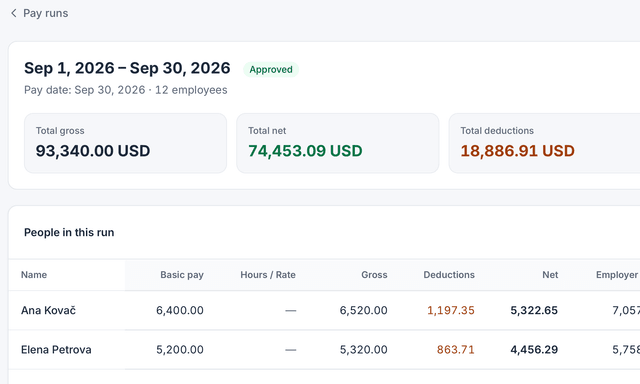
A September pay run in HourSquare, with demo data: total gross, net, deductions and employer cost, then each person’s pay.

A September pay run in HourSquare, with demo data: total gross, net, deductions and employer cost, then each person’s pay.

Real HourSquare screens, filled with a made-up demo company.

Tax packs for 24+ countries

Income tax and social contributions are worked out per employee from the pack. Country not covered? Start from a blank schedule.

Pay items you control

Salary, allowances and deductions are items you set up once and carry into every run.

Files in your layout

Save the columns, separator, decimal mark and date format once, and every export follows them.

How payroll works here

From pay items to a published payslip.

The four things to check before you choose a free payroll tool.

A tax pack, or your own pay items

A pay schedule runs on one country's tax pack, with that country's currency and tax year, so a company with people in two countries has two schedules. Where there is no pack, a blank schedule works from the pay items you define: salary, recurring allowances and deductions.

  • Gross, deductions and net side by side for every employee
  • Review each person before the run is published
  • Currency and tax year follow the schedule's country
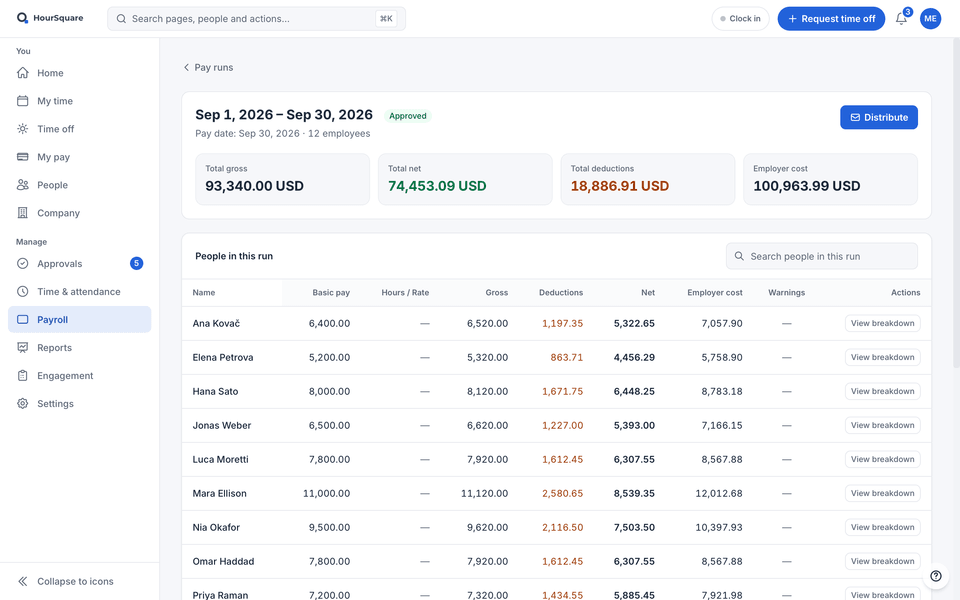
A pay run in HourSquare with gross, deductions and net per person (demo data).

A pay run in HourSquare with gross, deductions and net per person (demo data).

Payslips people can read

Every run gives each employee a payslip that lists each pay item with gross, deductions and net pay. You word it in your own language, and each reader sees dates and amounts in their own regional format.

  • Published only when you say the numbers are right
  • Employees open their payslips when they log in
  • One payslip for each person in every run, kept with the run
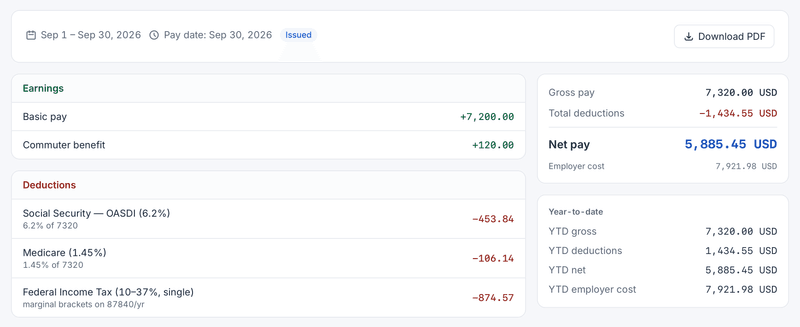
An employee’s September payslip in HourSquare: earnings, deductions, gross, net pay and employer cost (demo data).

An employee’s September payslip in HourSquare: earnings, deductions, gross, net pay and employer cost (demo data).

Files for the bank and the accountant

Two files, each in a layout you save once as a CSV or an Excel sheet. The payment file comes from an approved run, so your bank gets the columns it expects. The accountant export has one row per payslip with every pay line, for any date range or tax year.

  • Choose the columns, separator, decimal mark and date format
  • A payment file from each approved run
  • An accountant export for any date range or tax year

Hours and leave arrive on their own

Approved timesheets and approved leave for the period are pulled into the run, so nobody retypes hours from a spreadsheet. Payroll uses the same employee record that leave and time already use.

  • Managers approve hours before they reach payroll
  • Leave taken in the period shows up in the run
  • No file to export from one tool and import into another
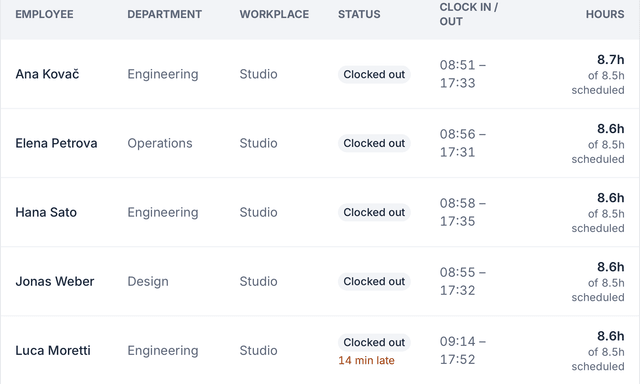
Attendance board in HourSquare: each person with department, workplace, status, clock-in and clock-out times and hours against the schedule (demo data).

Attendance board in HourSquare: each person with department, workplace, status, clock-in and clock-out times and hours against the schedule (demo data).

How it works

From sign-up to a published payslip.

You do the setup yourself; nothing here needs a consultant.

  1. Create the company yourself

    Sign up on this site. There is no demo to book and no card to enter.

  2. Add your people

    Add each person with their manager and workplace, along with their contract details.

  3. Set the schedule and pay items

    Pick the country's tax pack, or a blank schedule, then set salary and recurring items for each employee.

  4. Run payroll and publish

    Create a run for the period, review each employee, publish the payslips and download the payment file.

What free means

Payroll is not an add-on.

Free forever for teams of up to 10 people. Free for now for larger teams. If that changes, we'll tell you first. Payroll is in the free version like every other module.

Keep exploring

Where to go next.

FAQ

Questions about free payroll software

See all questions
Is the payroll really free?
Yes. Free forever for teams of up to 10 people. Free for now for larger teams. If that changes, we'll tell you first. Payroll is included with every other module, and signing up needs no card.
Which countries does it support?
Tax packs for 24+ countries today, each with its own currency and tax year. For any other country, start from a blank pay schedule and add your own pay items. Check your local rules for anything the pack does not cover.
Can I pay people in more than one country?
Yes, with one pay schedule per country. Each schedule has its own tax pack, currency and tax year.
Does HourSquare pay salaries or file taxes for me?
No. It calculates the run, produces payslips and gives you a payment file for your bank and an export your accountant can file from. You make the payments and submit the filings yourself.
How can I estimate take-home pay before I sign up?
Use the free salary calculators. Pick a country, and several countries also have a page of their own. They need no sign-up.

Ready when you are

Run payroll without the month-end scramble.

Every feature included, no card to sign up. Free forever for teams of up to 10 people; larger teams are free for now, and we'll tell you first if that changes.

Free forever up to 10 people · GDPR-native · EU-hosted

HOURSQUARE · EST 2026 HR you run yourself.