ტაბელები
თანამშრომლები ყოველდღიურად აღრიცხავენ ნამუშევარ საათებს და პერიოდის დასრულებისას წარადგენენ.
დროის აღრიცხვა
ტაბელები, რომლებიც თითოეული თანამშრომლის გრაფიკს ან ცვლების განრიგს ედრება, მენეჯერის მიერ დასტურდება და პირდაპირ ხელფასის დარიცხვაში გადადის — შუაში ცხრილების გარეშე.
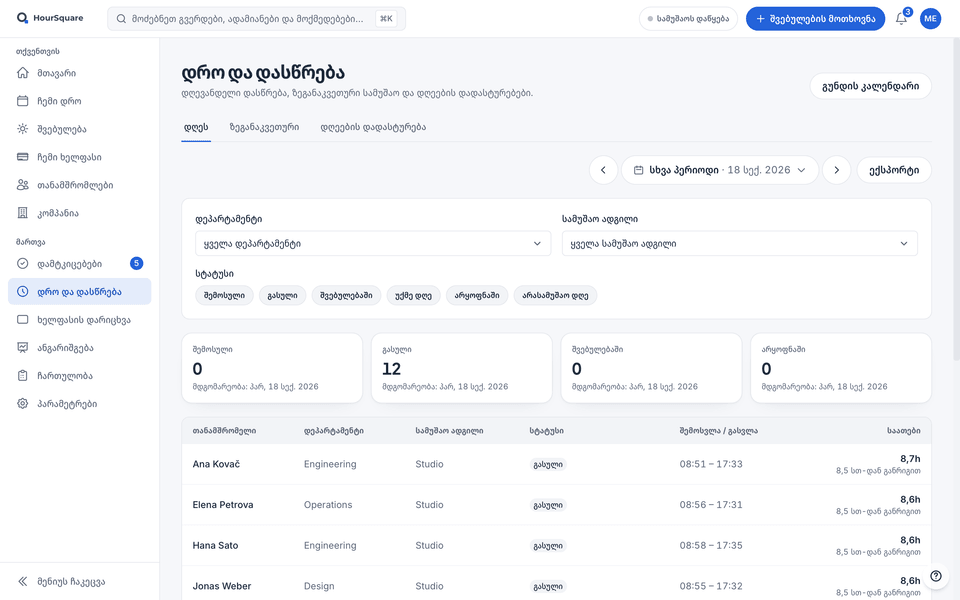
HourSquare-ის ნამდვილი ეკრანები, შევსებული გამოგონილი სადემონსტრაციო კომპანიის მონაცემებით.
თითოეულ თანამშრომელს აქვს გრაფიკი ან ცვლების განრიგი, ამიტომ ტაბელში მოსალოდნელი საათები აღრიცხულის გვერდით ჩანს.
საათები მხოლოდ მას შემდეგ ითვლება, რაც თანამშრომლის მენეჯერი დაადასტურებს.
დადასტურებული ტაბელები იმ პერიოდის სახელფასო უწყისში გადადის. არაფერი ხელახლა არ იკრიფება.
შესაძლებლობები
ის, რაც აღრიცხულ საათებს ხელფასისთვის სანდო მონაცემად აქცევს.
თანამშრომლები ყოველდღიურად აღრიცხავენ ნამუშევარ საათებს და პერიოდის დასრულებისას წარადგენენ.
თითოეულ თანამშრომელს დაუყენეთ ფიქსირებული გრაფიკი ან მბრუნავი ცვლების განრიგი. ის განსაზღვრავს, რამდენი საათია მოსალოდნელი ყოველ პერიოდში.
წარდგენილი ტაბელები თანამშრომლის მენეჯერთან მიდის. ის ერთ ადგილას ადასტურებს ან უკან აბრუნებს.
დადასტურების შემდეგ საათები სახელფასო უწყისისთვის მზადაა — ყოველგვარი ექსპორტისა და იმპორტის გარეშე.
ოფისის თანამშრომლების ფიქსირებული კვირის გრაფიკი და ცვლაში მომუშავეთა მბრუნავი განრიგი ერთსა და იმავე კომპანიაში გვერდიგვერდ თანაარსებობს.
როგორ მუშაობს
გზა, რომელსაც ტაბელი HourSquare-ში გადის, ოთხ ნაბიჯად.
თითოეულ თანამშრომელს მიანიჭეთ გრაფიკი ან ცვლების განრიგი, რომ HourSquare-მა იცოდეს, რამდენი საათი უნდა იმუშაოს.
აღრიცხავენ ნამუშევარ საათებს; გრაფიკი გვერდითვეა, ამიტომ განსხვავებები თვალსაჩინოა.
წარდგენილი ტაბელები დასადასტურებლად თანამშრომლის მენეჯერთან მიდის.
იმ პერიოდის სახელფასო უწყისი დადასტურებულ საათებს თავად იღებს.
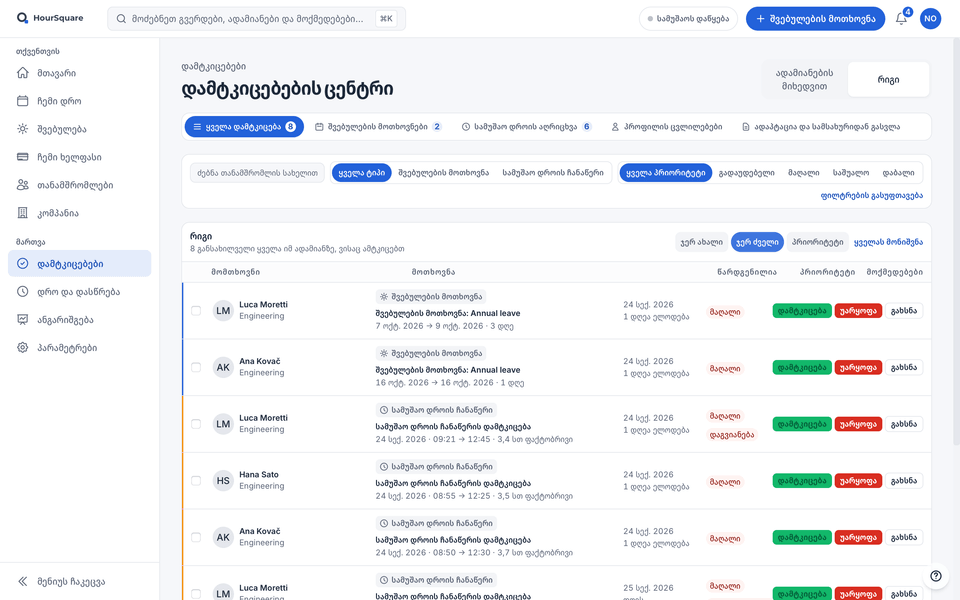
მუშაობს ერთად
დადასტურებული შვებულება ტაბელზე ჩანს, დადასტურებული საათები კი სახელფასო უწყისში გადადის.
მზად ხართ?
ამ ეტაპზე უფასოა, ყველა ფუნქციით; რეგისტრაციისთვის ბარათი არ არის საჭირო. თუ ეს შეიცვლება, წინასწარ შეგატყობინებთ.
ამ ეტაპზე უფასოა · GDPR · ევროკავშირის სერვერები